పరిచయం (Introduction)
Video Edit చేయడం కష్టంగా అనిపిస్తోందా? CapCut India లో Available కాదు అని Worry పడుతున్నారా? 🤔
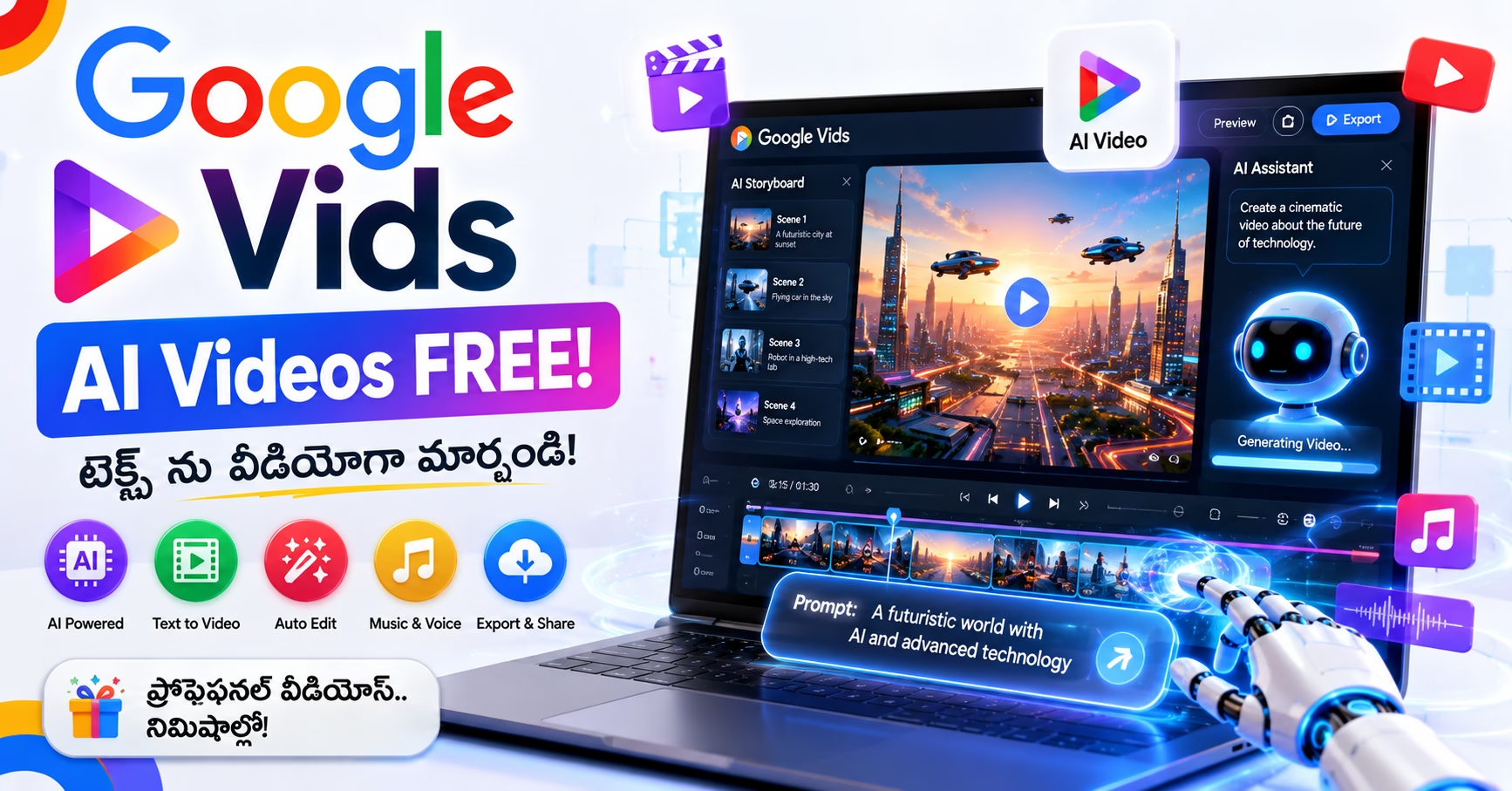
Google Vids వచ్చింది — Google’s Free AI Video Creation Tool! ఇప్పుడు మీరు Telugu లో Description రాస్తే — AI తనే Professional Video తయారు చేస్తుంది!
Google Vids ఇప్పుడు అందరికీ Google Account తో Free గా Available అయింది — ఒక్క రూపాయి కూడా అక్కర్లేదు! Veo 3.1 Model తో Text Prompt Type చేయడం మాత్రమే — AI Video Create చేస్తుంది. India లో YouTube Shorts లేదా Instagram Reels చేయాలంటే లేదా Small Business Promote చేయాలంటే ఇది Solid Option!
ఈ Google Vids App Review Telugu లో మనం అన్నీ నేర్చుకుంటాం:
- Google Vids అంటే ఏమిటి?
- Free లో ఏమేమి Features వస్తాయి?
- CapCut కంటే Better నా?
- India లో ఎలా వాడాలి?
- Telugu Creators కి Useful నా?
చదవండి — AI తో Video Making Start చేయండి! 🎬
Google Vids Quick Overview
| Feature | Details |
|---|---|
| Developer | |
| Launch Date | April 3, 2026 (India) |
| Price | Free (Google Account) ✅ |
| AI Model | Veo 3.1 (Video) + Lyria 3 (Music) |
| Max Video Length | 30 Minutes ✅ |
| Formats | Horizontal, Vertical (9:16), Square (1:1) |
| Collaboration | Real-time (Like Google Docs) |
| Export | YouTube Direct Export ✅ |
| Platform | Web Browser (Desktop) |
| India Available | ✅ Yes! Official |
| Google Account | Free కి చాలు |
Google Vids అంటే ఏమిటి?
Google Vids అంటే “Google Docs for Video” — అంటే Google Docs లో Documents రాసినట్టే, ఇప్పుడు Google Vids లో Videos తయారు చేయవచ్చు!
Google Vids అనేది Google Workspace లో Built-in AI-powered Video Creation App. మీరు చేయాలనుకున్నది Describe చేస్తే — Vids Storyboard Generate చేస్తుంది, Scenes Suggest చేస్తుంది, Stock Footage Add చేస్తుంది, AI Voiceovers Create చేస్తుంది, మరియు Veo 3 వాడి Text నుండి 8-second Video Clips కూడా Generate చేస్తుంది. Real-time Collaboration Google Docs లాగే పని చేస్తుంది — మీ Team అంతా Same Video ని ఒకేసారి Edit చేయవచ్చు.
Simple గా అర్థం చేసుకోవాలంటే:
మీరు Type చేస్తారు:
"Hyderabad లో Traditional Biryani గురించి
2 minute promotional video చేయి"

Google Vids చేస్తుంది:
✅ Storyboard తయారు చేస్తుంది
✅ Stock Footage Add చేస్తుంది
✅ AI Voiceover Create చేస్తుంది
✅ Background Music Add చేస్తుంది
✅ Professional Video Ready!
Google Vids Features — వివరంగా!
Feature 1: Help Me Create — AI Storyboard Generator 🤖
“Help me create” Feature వాడి “Create a 30-second quarterly report summary” వంటి Prompt Type చేయవచ్చు. Google Vids Storyboard Generate చేసి Veo 3 ద్వారా Stock Footage Suggest చేస్తుంది.
ఎలా వాడాలి:
Step 1: vids.google.com Open చేయండి
Step 2: "Create New Video" Click చేయండి
Step 3: "Help me create" Select చేయండి
Step 4: మీ Video గురించి Describe చేయండి
Step 5: AI Storyboard Generate చేస్తుంది
Step 6: Edit చేయండి + Export చేయండి ✅
Telugu Prompts ఇలా వాడవచ్చు:
"Create a 60-second video about benefits of
 learning Telugu language for beginners"

"Make a promotional video for small
 grocery store in Hyderabad"

"Create tutorial video about using
 PhonePe for payments"
Feature 2: Veo 3.1 — Text to Video Magic! 🎬
Google Vids కి Veo 3.1 మరియు Lyria 3 తో New AI Capabilities వచ్చాయి — High-quality Video Generation at No Cost మరియు Custom Music Creation కూడా Free!
Veo 3.1 అంటే ఏమిటి?
Google యొక్క Latest AI Video Generation Model! Text Prompt ఇస్తే Real-looking Video Clips Generate చేస్తుంది.
ఉదాహరణ:
Prompt: "A farmer in Telugu village
harvesting rice in morning sunlight"

Veo 3.1 Generate చేస్తుంది:
✅ Realistic Video Clip (8 seconds)
✅ Natural Lighting
✅ Authentic Scene
India లో ఉపయోగాలు:
- Product Promotional Videos
- Educational Content
- Social Media Videos (Shorts/Reels)
- Small Business Marketing
- NGO Awareness Videos
Feature 3: AI Avatars — Virtual Presenter! 👤
Google Vids లో Natural Language Prompts తో Avatars ని “Act” చేయించవచ్చు — Product తో, Prop తో, Equipment తో Avatar Interact చేయవచ్చు. Character Consistency Maintain అవుతుంది. Theme Based గా Appearance, Apparel మరియు New Backgrounds Customize చేయవచ్చు.
AI Avatar Feature అంటే ఏమిటి?
Camera ముందు Stand చేయకుండా AI Virtual Presenter వాడి Videos తయారు చేయవచ్చు!
ఎలా వాడాలి:
Step 1: Video లో New Scene Add చేయండి
Step 2: "Avatar" Option Select చేయండి
Step 3: Avatar Appearance Choose చేయండి
Step 4: Script Type చేయండి (Telugu లో కూడా!)
Step 5: AI Avatar Speaking Video Generate చేస్తుంది ✅
ఎవరికి Useful?
- Camera Shy Creators కి
- Teachers కి (Online Courses)
- Business Owners కి (Product Demos)
- YouTubers కి (Face Reveal చేయకుండా)
Feature 4: Lyria 3 — AI Custom Music! 🎵
Lyria 3 తో Custom Music Creation Free గా వస్తోంది — మీ Video కి Perfect Background Music AI Generate చేస్తుంది.
Custom Music అంటే ఏమిటి?
Copyright Free Music వెతకాల్సిన అవసరం లేదు — Lyria 3 మీ Video కి Specific గా Music Create చేస్తుంది!
ఉదాహరణ Prompts:
"Upbeat Telugu folk music for wedding
 celebration video"

"Calm background music for
 educational tutorial"

"Energetic music for gym workout
 promotional video"
Feature 5: Built-in Teleprompter 🎯
Recording Studio తో Built-in Teleprompter Feature ఉంది. Record చేస్తూ Script Screen లో Scroll అవుతుంది — వేరే Apps కి Switch చేయాల్సిన అవసరం లేదు. Export/Import Dance లేదు. Educational లేదా Explanation Content చేసే వారికి ఇది చాలా Time Save చేస్తుంది.
Teleprompter ఎలా వాడాలి:
Step 1: Record Screen Open చేయండి
Step 2: Script Upload చేయండి
Step 3: Scroll Speed Set చేయండి
Step 4: Recording Start చేయండి
Step 5: Script Screen లో Auto Scroll అవుతుంది ✅
ఎవరికి Useful?
- YouTube Videos Record చేసేవారికి
- Online Teachers కి
- Business Presentations కి
- Telugu Educators కి
Feature 6: Real-time Collaboration 👥
Google Docs లో Multiple People Documents Edit చేసినట్టే — Google Vids లో Team Members అందరూ Same Video Edit చేయవచ్చు!
Features:
✅ Multiple Editors ఒకేసారి
✅ Comments Leave చేయవచ్చు
✅ Version History Track చేయవచ్చు
✅ Share Link Easy గా
✅ Permissions Control చేయవచ్చు
Business కి Perfect: Marketing Team, Content Team — అందరూ Together Work చేయవచ్చు!
Feature 7: YouTube Direct Export ✅
Google Vids నుండి Directly YouTube కి Videos Export చేయవచ్చు.
Video Ready అయిన తర్వాత:
Export → YouTube Select చేయండి
→ Channel Choose చేయండి
→ Title, Description Add చేయండి
→ Publish చేయండి ✅
Feature 8: Vertical & Square Video Support 📱
March 6, 2026 లో Google Vids Vertical (9:16) మరియు Square (1:1) Video Support Add చేసింది. Max Video Length 30 Minutes కి Expand చేశారు.
| Format | Use Case |
|---|---|
| 16:9 Horizontal | YouTube, Website |
| 9:16 Vertical | Reels, Shorts, TikTok |
| 1:1 Square | Instagram Posts |
Google Vids ఎలా Start చేయాలి? Step-by-Step 📲
ఇప్పుడే Start చేయడానికి:
Step 1: Browser లో vids.google.com తెరవండి
Step 2: Google Account తో Login చేయండి
Step 3: "New Video" → "Blank" లేదా "Template"
Step 4: మీ Content Add చేయండి
Step 5: AI Features వాడుకోండి
Step 6: Export చేయండి ✅
Mobile లో వాడవచ్చా?
Google Vids ప్రస్తుతం Desktop Browser లో Best పని చేస్తుంది. Mobile Browser లో వాడవచ్చు కానీ Experience Limited గా ఉంటుంది.
Free vs Paid Plan — ఏమేమి వస్తుంది?
Basic Video Editing అందరికీ Free Google Account తో వస్తుంది. AI Features (Veo 3 Text-to-video, AI Avatars, Help Me Create) అన్ని Workspace Plans కి Available. Business Starter Users కి May 31, 2026 వరకు Full AI Access వస్తుంది.
Free Plan (Google Account):
| Feature | Free లో |
|---|---|
| Basic Editing | ✅ Yes |
| Templates | ✅ Yes |
| Stock Footage | Limited ✅ |
| AI Help Me Create | ✅ Yes |
| Veo 3.1 Video Gen | Limited ✅ |
| AI Avatars | Limited ✅ |
| Custom Music | Limited ✅ |
| Max Length | 30 Minutes ✅ |
| Vertical Video | ✅ Yes |
| YouTube Export | ✅ Yes |
| Collaboration | ✅ Yes |
Paid Plan (Google Workspace):
More AI Generation Limits, More Stock Footage, Priority Features — Business Users కి Worth it.
Google Vids vs CapCut vs InShot
| Feature | Google Vids | CapCut | InShot |
|---|---|---|---|
| Price | Free ✅ | Free (VPN) | Free/Paid |
| India Available | ✅ Official | ⚠️ VPN | ✅ Yes |
| AI Video Gen | ✅ Veo 3.1 | Limited | ❌ |
| AI Avatars | ✅ | Limited | ❌ |
| Custom Music | ✅ Lyria 3 | Library | Library |
| Collaboration | ✅ Best | ❌ | ❌ |
| Teleprompter | ✅ | ❌ | ❌ |
| Mobile App | ❌ (Desktop) | ✅ | ✅ |
| Templates | Good | ✅ Excellent | Good |
| YouTube Export | ✅ Direct | ❌ Direct | ❌ |
| Text-to-Video | ✅ | Limited | ❌ |
Google Vids India Users కి ఎందుకు Special?
India లో YouTube Shorts లేదా Instagram Reels చేయాలంటే లేదా Small Business Promote చేయాలంటే Google Vids Solid Option. Promo Video చేయాలా? Quick Birthday Clip చేయాలా? Google Vids Perfect!
Telugu Creators కి Use Cases:
1. YouTube Shorts: Telugu Content Creators కి Vertical 9:16 Format తో Shorts చేయవచ్చు — AI తనే Storyboard చేస్తుంది!
2. Small Business Videos: Restaurant, Shop, Boutique — Business Promo Videos Free గా చేయవచ్చు.
3. Educational Content: Telugu Teachers కి Online Course Videos చేయడానికి Perfect — Teleprompter + Avatar Feature!
4. Wedding/Event Promos: Telugu Weddings, Events కి Promotional Videos చేయవచ్చు.
5. NGO Awareness: Social Causes కి Powerful Videos Free గా చేయవచ్చు.
Honest Limitations — మీకు తెలియాల్సింది! ⚠️
Google Vids Challenges:
1. Telugu AI Voice: AI Voiceover ప్రస్తుతం Telugu లో Limited. English Best గా పని చేస్తుంది. Telugu Support Improve అవుతోంది.

2. Desktop Only: Mobile App లేదు — Desktop Browser లోనే వాడాలి.
3. AI Generation Limits: Free Plan లో AI Generation Limits ఉన్నాయి — Heavy Use కి Workspace Plan కావాలి.
4. Advanced Editing: Professional Video Editing Features (Green Screen, Motion Tracking) Limited గా ఉన్నాయి.
5. Internet Required: అన్నీ Cloud-based — Offline పని చేయదు.
Pros & Cons
Google Vids Pros ✅
- 100% Free India లో ✅
- Official — VPN అవసరం లేదు ✅
- Veo 3.1 AI Video Generation
- Lyria 3 Custom Music Free
- AI Avatars — Camera లేకుండా Videos
- Built-in Teleprompter
- Real-time Collaboration
- YouTube Direct Export
- Vertical + Square Video Support
- 30 Minute Max Length
- Google Account మాత్రమే చాలు
Google Vids Cons ❌
- Mobile App లేదు (Desktop మాత్రమే)
- Telugu AI Voice Limited
- Advanced Editing Features తక్కువ
- AI Generation Limits Free Plan లో
- Offline పని చేయదు
- CapCut Templates కంటే తక్కువ
- Learning Curve కొంత ఉంది
నా Final Verdict 🏆
Google Vids App Review Telugu లో Honest గా చెప్పాలంటే — CapCut India లో Available కాదు కాబట్టి Google Vids Telugu Creators కి Game-changing Tool!
Free గా Professional AI Videos Create చేయడానికి — India లో Official గా Available Tool — ఇది మీ Best Option!
Best For:
- YouTube Creators ✅
- Small Business Owners ✅
- Teachers / Educators ✅
- Social Media Marketers ✅
- Telugu Content Creators ✅
Not Best For:
- Mobile-only Users (Desktop కావాలి)
- Advanced Video Editors (Professional Tools కావాలి)
- Heavy Offline Users
Rating: 8/10 ⭐⭐⭐⭐⭐⭐⭐⭐
FAQs
Q1: Google Vids Free నా? అవుతుంది! Google Account తో Basic Features Free. AI Features కి కొంత Limits ఉన్నాయి. Full AI Access కి Google Workspace Plan కావాలి.
Q2: Google Vids India లో Available నా? అవుతుంది! April 3, 2026 నుండి India కి Official గా Available. VPN అవసరం లేదు — Direct vids.google.com లో Access చేయవచ్చు.
Q3: Telugu లో Videos తయారు చేయవచ్చా? అవుతుంది! Telugu Prompts ఇవ్వడం వల్ల AI Telugu Context అర్థం చేసుకుంటుంది. AI Voice ప్రస్తుతం English Better — Telugu Voice Support Improve అవుతోంది.
Q4: CapCut వాడేవారు Google Vids Switch అవ్వాలా? Different Use Cases కోసం. CapCut Mobile Editing కి Best, Templates Excellent. Google Vids AI Generation + Collaboration + India Official Access కి Best. రెండూ కలిపి వాడవచ్చు!
Q5: Google Vids Mobile లో వాడవచ్చా? ప్రస్తుతం Desktop Browser లో Best పని చేస్తుంది. Mobile Browser లో వాడవచ్చు కానీ Experience Limited. Mobile App Future లో వస్తుంది.
Q6: Veo 3.1 అంటే ఏమిటి? Veo 3.1 Google’s Latest AI Video Generation Model. Text Prompt ఇస్తే Realistic Video Clips Generate చేస్తుంది. Google Vids లో Built-in గా Free గా వాడవచ్చు.
Q7: YouTube Shorts కి Vertical Videos చేయవచ్చా? అవుతుంది! Google Vids 9:16 Vertical Format Support చేస్తుంది — YouTube Shorts, Instagram Reels, WhatsApp Status అన్నింటికీ Perfect Size లో Videos చేయవచ్చు.
ఇప్పుడే Start చేయండి!
🌐 vids.google.com → Google Account Login → New Video ✅
Related Articles
మీరు Google Vids వాడారా? Experience ఎలా ఉందో Comment లో చెప్పండి! 👇
ఈ Article Creator Friends తో Share చేయండి! 😊
TeluguTech.io — తెలుగు లో Tech అర్థం చేసుకోవడానికి మీ Trusted Source! 🙏